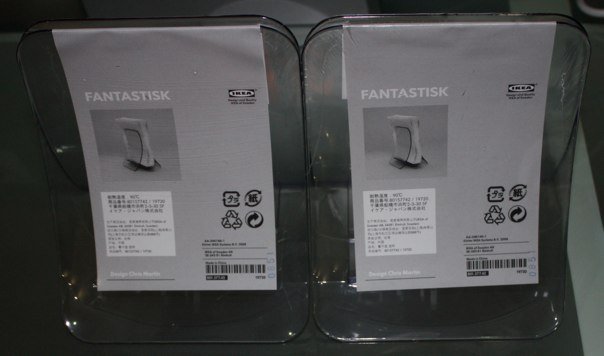
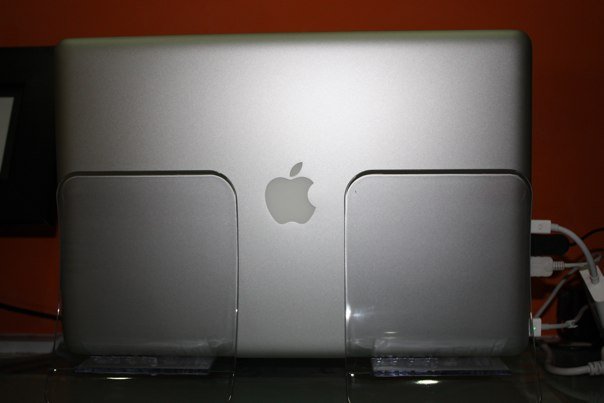
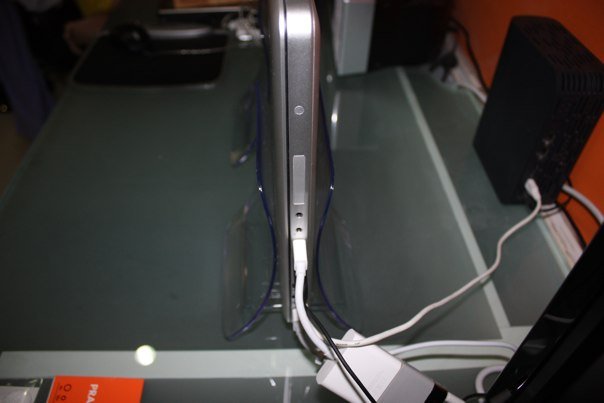
A great Ikea hack by Simon to create an under SGD$8 MacBook Pro vertical stand using 02 x FANTASTISK Napkin holder.
FANTASTISK Napkin HolderMacBook Pro 15" with "Vertical stands"MacBook Pro 15" with "Vertical stands"
22 thoughts to “DIY $8 MacBook Pro vertical stand”
i was looking all over for vertical diy stand ideas for my old macbook pro and came across your site today. i felt inspired by its very low cost and effectiveness that i took pictures here: http://www.flickr.com/photos/blackfeathers/sets/72157620600457773/ i love how ikea made the holder clear, so it can display any artwork unobstructed. it solved a problem during my brainstorming about a diy build. it’s very simple and elegant. 🙂
Wow! That is such a great idea! THANK YOU! I’ve been wanting a vertical stand for my macBook Pro, but hesitate on spending so much money. This is perfect!
1. Are there any ways to prevent scratches from the insertion?
2. is the foundation strong and stable enough to hold the weight of a MBP?
3. How do you turn the computer On and Off since the power button is inside the clamshell?
For me, it still serves me well after using it for more than 2mths, so I suppose it’s strong and stable enough to hold the weight of a MBP.
Definitely have to open lid, power on, then close lid and rest on holder. For me, I only shutdown when I’m bringing the MBP out, otherwise usually it’s in sleep mode if not in use and just need to press on external keyboard or mouse to wake it up.
I’m using a single FANTASTISK with a 13″ white MacBook and it’s perfect. So much cheaper than a normal vertical stand, and still stylish.
I had some stick-on cork pads left over from another project that work great to keep the plastic surfaces from scratching each other. Thanks so much for blogging about this. You saved me $50!
Wow! That is such a great idea! THANK YOU! I’ve been wanting a vertical stand for my macBook Pro, but hesitate on spending so much money. This is perfect!
That is a great idea! Can someone buy and send one FANTASTISK Napkin holder to me in Brazil? I already searched eBay but no one ship it here. I can send money in PayPal.
super cool! i love your idea.
I have one idea for you too, maybe you can try to decorate your macbook with wrist protector from skinstyler.com
with your creativity, i think you can have a great custom design by yourself.
Great idea! I did try this, and it works great! Just be sure to stand the MacBook Pro with the hinge (fan vents) up. Heat rises, so this way it won’t put undue stress on the fans or components inside.
i was looking all over for vertical diy stand ideas for my old macbook pro and came across your site today. i felt inspired by its very low cost and effectiveness that i took pictures here: http://www.flickr.com/photos/blackfeathers/sets/72157620600457773/ i love how ikea made the holder clear, so it can display any artwork unobstructed. it solved a problem during my brainstorming about a diy build. it’s very simple and elegant. 🙂
Wow! That is such a great idea! THANK YOU! I’ve been wanting a vertical stand for my macBook Pro, but hesitate on spending so much money. This is perfect!
Just thought of one question. Will they scratch the aluminum over time?
The best information i have found exactly here. Keep going Thank you
Won’t it scratch the macbook pro?
Hi, this looks great! couple questions though.
1. Are there any ways to prevent scratches from the insertion?
2. is the foundation strong and stable enough to hold the weight of a MBP?
3. How do you turn the computer On and Off since the power button is inside the clamshell?
thanks and keep the good idea coming!
That’s genius!!! Thank you.
It wouldn’t really scratch the MBP unless the holder is dirty/dusty, thus far I’ve yet to see any visible scratch.
You may choose to paste protectors like:
http://www.ikea.com.sg/catalog/product_display.asp?art=24155600-1651-19-69-939016133-98929994
For me, it still serves me well after using it for more than 2mths, so I suppose it’s strong and stable enough to hold the weight of a MBP.
Definitely have to open lid, power on, then close lid and rest on holder. For me, I only shutdown when I’m bringing the MBP out, otherwise usually it’s in sleep mode if not in use and just need to press on external keyboard or mouse to wake it up.
I seriously recommend flipping it around. The heat comes out the back of these- so the back should be up.
A very nice idea! I live in Italy and…i can finde the same “Fantastik” in my Ikea lol thanks to Globalization?¿ LOL
Hmm. It doesn’t look like you have attached the two napkin holders together. I am thinking this would be an improvement.
I’m using a single FANTASTISK with a 13″ white MacBook and it’s perfect. So much cheaper than a normal vertical stand, and still stylish.
I had some stick-on cork pads left over from another project that work great to keep the plastic surfaces from scratching each other. Thanks so much for blogging about this. You saved me $50!
http://www.flickr.com/photos/csixty4/4439165813/
Wow! That is such a great idea! THANK YOU! I’ve been wanting a vertical stand for my macBook Pro, but hesitate on spending so much money. This is perfect!
Just want to say that this is, as so many people have already mentioned, a great idea. You should keep doing more posts on tips and diy stuff!
That is a great idea! Can someone buy and send one FANTASTISK Napkin holder to me in Brazil? I already searched eBay but no one ship it here. I can send money in PayPal.
This is the best! Ikea is selling them for $1.99!
Awesome and creative idea! Thanks for sharing!
super cool! i love your idea.
I have one idea for you too, maybe you can try to decorate your macbook with wrist protector from skinstyler.com
with your creativity, i think you can have a great custom design by yourself.
Awsome !
2.99€ in France.
http://www.ikea.com/fr/fr/catalog/products/50107051/
Thank you!! I was just getting ready to drop $49+ for a stand.
Just ordered a Bookarc in ebay but the seller cancelled the order. I’ll save much money. Thank you for sharing your idea!!
Great idea! I did try this, and it works great! Just be sure to stand the MacBook Pro with the hinge (fan vents) up. Heat rises, so this way it won’t put undue stress on the fans or components inside.